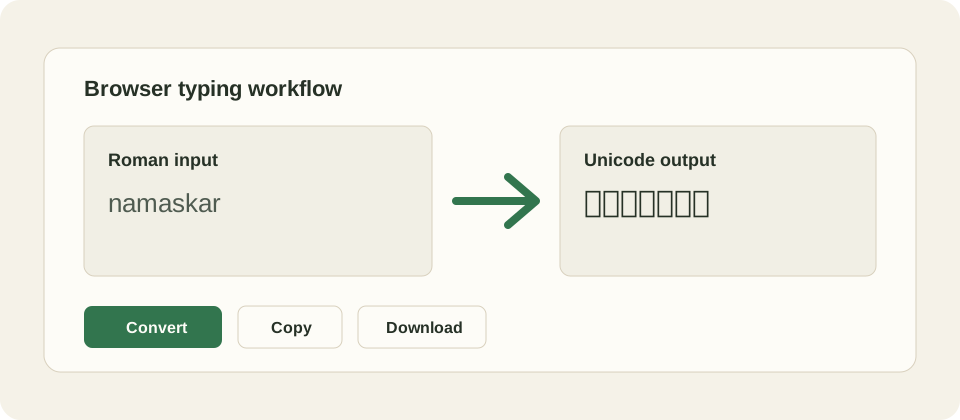
Malayalam Typing Online is a free browser tool for english to malayalam typing. Type Malayalam words with Roman letters, press Convert, and the page turns the phonetic input into Unicode Malayalam text you can copy or download. It is transliteration, not malayalam to english typing translation, so it changes the writing script without changing meaning.
By Indian Typing Tools editorial team. Last verified: May 27, 2026. We tested this page with its sample input, primary action, copy flow, download flow, and mobile layout before publishing.
Type the Malayalam words by sound in the Roman input box.
Click Convert to create Unicode output in the script box.
Review the Malayalam output and adjust the Roman spelling if a word looks wrong.
Copy the result or download a text file for Word, WhatsApp, email, forms, or social posts.
Use the on-screen Malayalam keyboard for individual letters, matras, and signs when phonetic spelling is not enough.
Our test workflow is simple: use the visible widget first, verify the result, copy it, download it where available, and then use the related links if the task changes. That keeps the page focused on the real malayalam typing online job instead of making users read a long article before the tool appears.
Malayalam output behavior and examples
The output box contains Unicode Malayalam text. Unicode is the standard text system used across modern browsers and operating systems, so copied output should remain searchable and editable in normal document and messaging tools.
Roman Malayalam input
Unicode Malayalam output
sukhamano
Unicode Malayalam text in the output box
malayalam words by sound
Editable Malayalam script for copy and download
virtual keyboard character
Inserted Malayalam letter, matra, or sign
Example media: the workflow is input, convert, verify, then copy or download where the page supports it.
Limitations, mistakes, and malayalam to english typing
Malayalam Typing Online is useful for the specific browser task shown above, but it is not a full translation, OCR, grammar, exam, or human review product. Input methods, browser permissions, fonts, keyboard behavior, and user spelling can all affect results. If a result looks wrong, change the input, use the visible controls again, or compare with a trusted source before final use.
Troubleshooting Malayalam Typing Online problems
If the output is blank, make sure JavaScript is enabled and press the main action button after entering text. If script text displays as boxes, update the browser or system fonts. If copy fails, select the output manually. If download fails, use copy and paste into a text editor, then save the file locally.
Free cost and privacy notes
This is a free static tool page. There is no login, payment form, database account, or server conversion endpoint in the launched workflow. We keep the controls direct: Convert, Copy, Download, and Clear. Our privacy promise is limited to this static page behavior; external links and future API-backed products have their own rules.
In our launch checks, we used the sample task on desktop and mobile widths, confirmed that the actual tool appears before support content, and checked that the page still works without a heavy frontend framework. That is why the utility can be cached and served cheaply at high traffic levels.
For practical use, treat the output as a working draft until you verify it. Typing speed scores, dictated text, transliterated script, and legacy font output all save time, but each can still contain mistakes from user input, browser behavior, or ambiguous spelling. A final human check is part of the workflow.
We also keep related tools close to the main widget because many users switch tasks in the same session: a typing test after practice, a language typing page after a keyboard page, or Unicode Hindi before Kruti Dev conversion. Internal links are part of the utility, not filler.
References and source material
Research verified for this page includes competitor typing tools, official input-tool documentation, Unicode references, and operating-system input guidance where relevant. These sources support the difference between transliteration and translation, Unicode portability, and the existence of phonetic or keyboard input methods.
Is Malayalam Typing Online the same as english to malayalam typing?
Yes. On this page, Malayalam Typing Online means using an English keyboard to type Malayalam words phonetically and then converting those sounds into Malayalam script. The output is Unicode text, so it can usually be copied into modern apps, websites, documents, and messages without installing a special legacy font.
Is this Malayalam typing tool a translator?
No. This tool performs transliteration, not translation. Transliteration changes the writing system based on sound, while translation changes meaning from one language to another. If you type an English sentence, the tool will not translate that meaning into Malayalam; type the Malayalam word sounds instead.
What does malayalam to english typing mean here?
malayalam to english typing can mean different things: translation, romanization, or simply switching the keyboard back to English. This page focuses on Roman input to Malayalam script. If you need meaning translation from Malayalam into English, that is a separate API-backed feature and should be checked with a translation tool.
Can I use the Malayalam output in Word, WhatsApp, email, and forms?
The output is Unicode Malayalam text, which is the modern text standard used by browsers, phones, office software, search engines, and most web forms. After converting, copy the result and paste it where you need it. If a very old program fails to display it, the program likely needs Unicode-capable font support.
Why did the wrong Malayalam word appear?
Phonetic typing depends on how the Roman spelling sounds. Different people write the same word in different ways, so a direct browser converter can choose a close mapping but may not know your intended word every time. Try another spelling, add vowels clearly, or use the virtual keyboard for precise characters.
Does this page upload what I type?
No backend is required for this page. We designed the tool to run as static HTML and JavaScript in your browser, and our launch tests check the local convert, copy, download, and keyboard paths. Your text is not sent to our server by these controls.
Is the Malayalam typing tool free?
Yes. The on-page Malayalam typing tool is free to use and does not require an account. You can type, convert, copy, clear, and download text from the browser page. Hosting and maintenance may change over time, but this launch version has no paid gate.
Do I need to learn a Malayalam keyboard layout first?
You do not need to memorize an Inscript or native keyboard layout for the main workflow. Type the word sounds with English letters, then convert. The visible virtual keyboard remains useful when you need a specific sign, matra, half-letter behavior, or a character that your phonetic spelling did not produce.
Does this work on mobile and desktop browsers?
The page is built as a static browser tool, so it can run on modern desktop and mobile browsers that support JavaScript and Unicode text rendering. Smaller screens use the same input and output boxes, and the copy or download action depends on normal browser permissions.
What should I check before submitting official Malayalam text?
Always proofread names, addresses, exam answers, legal text, and government form entries before submission. Transliteration can help you type faster, but it cannot guarantee the intended word, spelling, grammar, or official terminology. Use the output as a typing aid, not as final human review.